Thursday, July 19, 2012

Retina MacBook Pro Shipping Estimates Improving for the First Time

For the first time since its launch just over one month ago, Apple's Retina MacBook Pro has begun to see improvements in shipping estimates for new orders placed through the company's online store. The improvement has appeared first in Apple's Asia-Pacific markets, which have seen estimates move from 3-4 weeks to 2-3 weeks. 


Shipping estimates in Apple's other main distribution regions of the Americas and Europe/Middle East/Africa remain at 3-4 weeks, but it is likely they will see similar improvements in the near future. 

While Apple announced the Retina MacBook Pro as immediately available on its debut day of June 11, shipping estimates quickly slipped to 2-3 weeks by the end of the day andreached 3-4 weeks roughly 24 hours later. Estimates have remained steady at 3-4 weeks since that time until today's improvement in the Asia-Pacific channel. 

Update: The improved 2-3 week estimates have now spread to the Americas and are beginning to filter into a number of European stores.

Apple to Launch OS X Mountain Lion on July 25th?


Sunday July 15, 2012 8:26 pm PDT by Arnold Kim


Apple's set to release the latest version of OS X later this month. OS X Mountain Lion (10.8) is a $19.99 upgrade that will be available on the Mac App Store. 

The latest Mac operating system contains a number of improvements and features. The list includes Reminders, Messages, Notification Center, Power Nap, Dictation, Gatekeeper and many more

Apple has only said that the new version of OS X will launch in July, but 9to5Mac now speculates that Apple may be launching the new version of OS X on July 25th.

The reasoning comes from reports that Apple Retail stores will be performing overnight updates to stores on July 24th. Those updates could include the posting of marketing information and OS installations of OS X Mountain Lion to store computers. 

While the exact content of the overnight updates aren't yet confirmed, the timing would also correlate with Vacation blackout days that MacRumors had heard from several employees at a thirty-party firm that offers technical support for Apple products. 


Show User Library Directory in Mac OS X 10.7 Lion


Show Users Library Directory in Mac OS X Lion


Mac OS X 10.7 defaults to hiding the users Library directory, this is probably to keep people from accidentally deleting or damaging files that are necessary for OS X Lion to function properly. That is fine for novice users, but for some of us, we want to be able to access ~/Library/ at will. A visible Library folder was also the default setting in past versions of Mac OS X, here is how to get this back.

Show User ~/Library in OS X Lion

Launch Terminal from Spotlight or Launchpad -> Utilities, and enter the following command to show or hide the directory:
chflags nohidden ~/Library/
The users Library folder will immediately become visible again. Reverting this back to the standard Lion setting is simple too:

Hide User ~/Library in OS X Lion (default setting)

This returns to the default setting of hiding the user Library directory:
chflags hidden ~/Library
Changes take effect immediately again, and Library becomes invisible to the user.

Tuesday, December 27, 2011

Jailbreak iOS 5.0.1 Untethered On iPhone, iPad, iPod touch (A4 Devices) Now Using Redsn0w 0.9.10b1 / Corona [Video Tutorial]

Resources: Redmond Pie

It has been nearly eight weeks since the first declaration by pod2g that he had found a bug that he believed could provide an untethered jailbreak for iOS 5. We find ourselves exactly fifty days down the line, and what I imagine has been a lot of sleepless nights for the developers involved, but we now officially have the release of an untethered jailbreak for all A4 devices running iOS 5.0.1.

iOS-5.0.1-WM

On December 22nd, pod2g announced via his official blog that would be passing all of his work and details across to the researchers at the Chronic Development Team partly to allow him to concentrate on progressing the development of an A5 jailbreak, and partly because he believed that the Chronic Dev Team could integrate and package all of his work into a distributable jailbreak.

It seems that his instincts were correct as only five days after that decision was made, we are seeing a release of a jailbreak for A4 devices on iOS 5.0.1 which has been implemented by both the Chronic Dev and iPhone Dev teams.

The iOS 5.0.1 untethered jailbreak contains the exact same set of files that pod2g provided to the Chronic Dev Team, and can be distributed as either a download via Cydia by searching for a package named ‘Corona’, for users who are already jailbroken tethered, or through a Redsn0w bundle for users who have running stock iOS and have been waiting for this untether.

At the time of writing, it is worth noting that this jailbreak currently only supports iOS 5.0.1 with Chronic Dev Team member p0sixninja tweeting out that 5.0 will follow soon after a number of small bugs have been eradicated and more testing has been carried out. Pod2g has also released some advice to A4 and A5 users advising not to update their devices to iOS 5.0.2 or 5.1 when released as this would cut their chance of a future jailbreak.

Note: The jailbreak released is supported on all A4 based (and below) devices like iPhone 4, 3GS, iPod touch 3G/4G and iPad 1. Newer A5-based devices like iPad 2 and iPhone 4S are currently not supported.

For Users On iOS 5.0.1 Tethered Jailbreak:

If you are currently operating an A4 device which has a tethered jailbreak using Redsn0w, Ac1dSn0w or Sn0wbreeze then you can simply launch Cydia from your Springboard and download a package named ‘Corona’ which will provide you with an untethered jailbreak.

photo (2)

For Users On Stock iOS 5.0.1:

If your device is running stock iOS 5.0.1 then you can use download the latest Redsn0w 0.9.10b1 to for either Windows or Mac to give yourself an untethered jailbreak, instructions for which can be found below.

untetheredJB501

Step 1: Download the latest version of Redsn0w from the links given above.

Step 2: Start Redsn0w, select "Jailbreak" then check "Install Cydia". Follow the onscreen steps to place your device into DFU mode.

Step 3: Wait for Redsn0w to apply the full untethered jailbreak!

Once done, your iPhone, iPad or iPod touch will be rebooted into fully untethered jailbreak mode!

Jailbreak iOS 5.0.1

iPhone 4 GSM, jailbroken on iOS 5.0.1

For Users Who Rely On Unlock:

For those of you who rely on Ultrasn0w or Gevey SIM unlock must preserve the old baseband using “Custom IPSW” option found in Redsn0w.

You can follow us on Twitter, add us to your circle on Google+ or like our Facebook page to keep yourself updated on all the latest from Microsoft, Google, Apple and the web.

Spire: First Legal Siri Port For iPhone 4, iPhone 3GS, iPod touch, iPad 1 Now Available On Cydia


Resource: Redmond Pie

Well known and respected developer chpwn has finally released first legal Siri port to public for older generation iOS devices. Dubbed as Spire, the port allows iPhone 4, iPhone 3GS, iPod touch 4G/3G and first-gen iPad users, jailbroken on iOS 5, to run Siri, which has official been available only for iPhone 4S users.

Available for free on Cydia right now, the download comes in at around 100mb in size as it uses a new method to obtain all the necessary files legally directly from Apple’s servers.

There is however a catch to it. It is not as easy to get it running as


it sounds. You will need to have your own Siri proxy setup, and an iPhone 4S for authentication to get it running on your older-gen iOS device. As explained by chpwn on his blog:

However, Spire is not a complete solution. Apple still requires authorization to use Siri, so information from an iPhone 4S is still required. To insert this information, Spire allows you to enter your own proxy server address. I’ve put up a list of my ideas on how you might get access to a proxy; hopefully you can figure something out.

To get a Siri proxy, chpwn suggests:

  • westbaer’s SiriProxy fork
    • Own an iPhone 4S too: Maybe you already own an iPhone 4S, and just want Siri on another device of yours. This is simple; you can just use the above proxy yourself.
    • Find a friend: Maybe your friend has an iPhone 4S and will let you use their authentication tokens (maybe in exchange for some cool SiriProxy plugins). Then, you can share the authentication. Or, maybe you gave your relative your old iPhone when you got your iPhone 4S: now you can share your token and give them Siri.
  • Pay up: It’s very likely that soon we will see for-pay services online to rent you some space on a Siri proxy, attached to one of their iPhone 4S devices. I haven’t seen anything like this yet, but I’ll keep my eye out, and I would encourage anyone who is interested to set something like this up.
  • And now for something completely different: As I suggested earlier, you might be able to replace Siri entirely. A simple method might be to use Google Chrome’s speech “API” hooked up to some code to decode the Siri requests and parse Google’s result. Or, someone could hook it up to some logic backends like many of the clones available on Android: the possibilities are endless.

To install Spire package, simply head over to Cydia, search for “Spire”, and install it. You don’t need to add any new repo as it is available on Cydia’s default BigBoss repository.

You will obviously need to have a jailbroken device to get it to work. For jailbreaking iOS 5 tethered using Redsn0w, you can follow our complete step by step guide posted here, or here if you want to use Sn0wbreeze on Windows. Since jailbreak on iOS 5 is currently limited to tethered boot only, you can install ‘SemiTether’ patch (instructions here) from Cydia to make your jailbreak semi-tethered on iOS 5. For those of you on iOS 5.0.1 can follow our instructions posted here on how to jailbreak using Redsn0w, or here using Ac1dSn0w (instructions with Ac1dSn0w Beta 2 here), or here using Sn0wbreeze.

Check out our iPhone Apps Gallery and iPad Apps Gallery to explore more apps for your iPhone, iPad and iPod touch.

Monday, December 26, 2011

Apple News | Apple to Launch the iPad 3 on Steve Jobs' Birthday?

The Economic Daily News cites sources close to Taiwanese makers in the iPad 3 supply chain who say Apple may be planning to release its new tablet on February 24th, Steve Jobs birthday.

FocusTaiwan quotes the Daily News:

The sources said all OEM and ODM makers have exercised great caution in ensuring the smooth operations of their production lines. To meet the iPad3 delivery date, the sources said, main assembler Hon Hai Precision Industry's iPad division will only allow its employees to take five days off during the Lunar New Year holiday, while staff at the company's other divisions will have a longer holiday.

Casing producer Catcher Technology said that at least some of its employees will have to work overtime during the Lunar New Year holiday.Other high-end component suppliers such as battery maker Simplo Technology, connector maker Amer International Group and optical lens supplier Genius Electronic Optical Co. are all planning to ask at least some of its employees to work during the Lunar New Year holiday, industry sources said.


Previous reports have estimated that the iPad 3 would be released in March.

Read More

Thursday, December 22, 2011

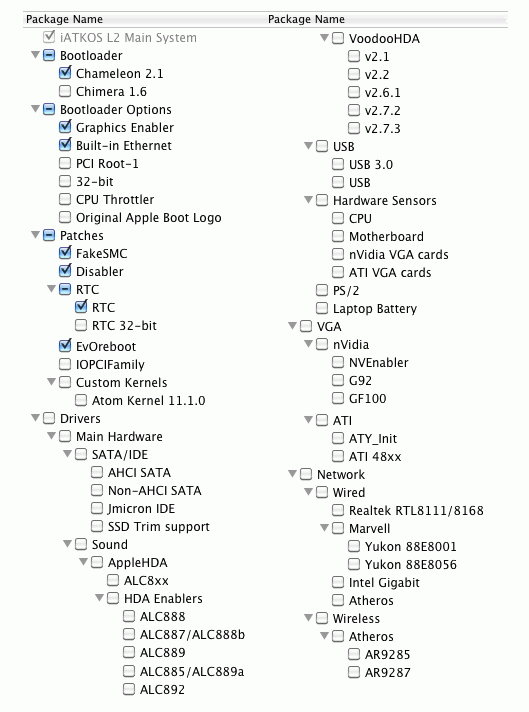
iATKOS L2 - Hackintosh LION 10.7.3 (PC)

iATKOS L2 - Hackintosh LION 10.7.3 (PC)
iATKOS L2 - Hackintosh LION 10.7.3 (PC) | 4.1GB
iATKOS L2- H@ckint0shLION 10.7.2+ LION 10.7.3 Update
for: Native PC (x32 & x64)and also Virtual Machine(VMware & VirtualBox)

★★★Change Log from L1 to L2:★★★

iATKOS L2 - Hackintosh LION 10.7.3 (PC)

- 10.7.2 main system> Finally, Lion main system is completely OK for this release, though we are running it on real Macs. We discovered that previous release L1 and most retail installations starting from 10.7.0 have problems, especially for sandybridge hardware, tested on real Macs.. Upgrade installations from Snow Leopard are OK but they work slower than usual.
:arrow:I recommend iATKOS L2 release or retail installs using only the full 10.7.2 retail package.

Read More...